
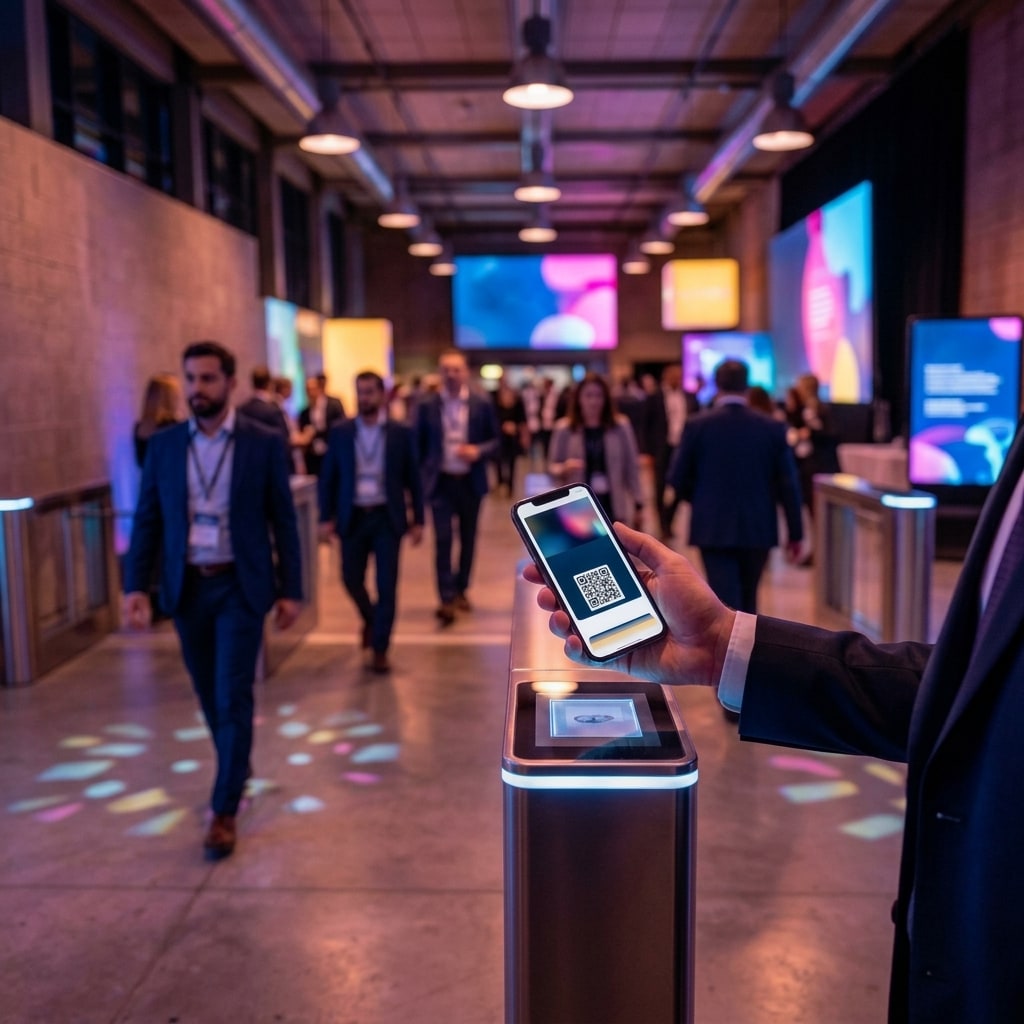
Digital wallet event tickets are native mobile credentials stored inside system applications such as Apple Wallet and Google Wallet that trigger automatically on a smartphone lock screen based on geofence coordinates and scheduled event start times. Unlike raw image files distributed across messaging apps or static PDF attachments buried in email threads, digital wallet passes eliminate manual in-device searches and function entirely offline at the point of scanning. Event producers, conference planners, and venue operations teams adopting native mobile passes consistently reduce check-in times to seconds per attendee while maintaining an active, bidirectional communication channel for real-time logistics updates.
A mobile digital wallet is a native operating system application pre-installed on iOS and Android devices engineered to store payment cards, boarding passes, transit tickets, and identity credentials in an encrypted, standardized format. When attendees receive a digital pass, they provision it directly to their device operating system with a single tap, bypassing third-party app downloads and eliminating credential loss.
The Gallery Trap: Why Image Files Create Check-In Bottlenecks
Distributing tickets as image files via WhatsApp or email seems practical on the surface, but it introduces compounding latency during peak check-in windows. Once an attendee saves an image to their local device, it gets buried within a general photo gallery alongside camera photos, personal screenshots, and receipts. Upon arriving at the venue, attendees stand before the turnstile or check-in desk scrolling through media libraries to locate an asset delivered days earlier. The operational delta between a file stored in device memory and a file immediately accessible on the screen translates directly into queuing congestion.
Furthermore, optical 2D barcode scanners require precise contrast and backlighting to decode QR patterns reliably. A standard gallery screenshot displays at whatever ambient brightness setting the user's phone currently maintains. In dimmed exhibition halls, outdoor registration tents, or evening venue lobbies, default screen brightness frequently fails optical scan thresholds. Gate staff must repeatedly instruct attendees to turn up their screen brightness, pinch-to-zoom the code, or wipe reflective display smudges. An incremental delay of just 15 seconds per attendee creates severe throughput degradation when hundreds of visitors converge within a compressed 30-minute window. We explore how message distribution workflows contribute to physical gate congestion in our analysis of delivery timing on WhatsApp for smooth queue management.
The fundamental failure mode at check-in rarely stems from hardware read speeds or barcode encoding densities. High-throughput optical scanners process alphanumeric QR strings in milliseconds. The bottleneck is human retrieval latency and unmanaged display optics.
Technical Architecture of Apple Wallet and Google Wallet
Mobile wallet passes are not static graphic files; they are dynamically rendered, cryptographically signed data packages integrated into the host operating system. On iOS, passes use the standardized .pkpass file archive, which bundles structured JSON manifests, localized localization strings, asset bitmaps, and cryptographic signatures defined in the official Apple Developer Documentation. On Android devices, credentials interface natively with the Google Wallet API, which renders JWT-signed pass objects directly through Google Play services.
Implementing these standardized formats provides three mission-critical operational mechanisms absent in static images:
- Geofencing and Time-Based Lock Screen Triggers: A wallet pass bundle includes explicit geographic coordinates (latitude and longitude) and ISO-8601 scheduling metadata. As the attendee enters the defined perimeter of the venue near the scheduled doors-open time, the mobile operating system presents a persistent notification directly on the lock screen. A single swipe or tap launches the pass instantly, requiring zero device unlocking, zero app navigation, and zero gallery searches.
- Autonomous Screen Backlight Calibration: When an authorized wallet pass renders on screen, the operating system kernel temporarily overrides user-level display preferences, ramping backlight output to 100% luminance to ensure maximum contrast for optical imager lenses. The display automatically drops back to baseline brightness the moment the pass is dismissed.
- Native Offline Resilience: After the initial provisioning payload downloads to the device, the complete pass architecture—including cryptographic hashes, metadata strings, and vector barcode structures—resides permanently within local sandbox storage. If cellular networks saturate or venue Wi-Fi fails under concurrent device loads, the pass displays natively without network requests.
Operational Performance: Physical Gate Scanning Benchmarks
Designing effective registration perimeters requires infrastructure architects to evaluate concrete throughput figures rather than hypothetical check-in speeds. The following matrix illustrates the operational performance differences across standard credential delivery methods:
| Performance Metric | Image Screenshot / WhatsApp Media | PDF Attachment via Email | Native Digital Wallet Pass |
|---|---|---|---|
| Average retrieval latency per attendee | 10–35 seconds | 20–50 seconds | 1–3 seconds (lock-screen prompt) |
| Network connectivity dependence at door | Partial (requires pre-caching) | High (mailbox/cloud sync) | Zero (locally cached in OS) |
| Display luminance control | Manual user intervention | Manual user intervention | Automatic system-level override |
| Post-issuance data mutability | Impossible (static asset) | Impossible (static asset) | Complete (via push updates) |
| Hourly throughput per scanning terminal | 120–180 attendees | 80–120 attendees | 350–500 attendees |
Calculating terminal allocation against empirical retrieval latencies prevents gate overflow during peak registration windows. For comprehensive staffing and scanner calculations, consult our operational framework on calculating check-in stations to prevent peak-hour queues.
Dynamic Push Updates: Managing Logistics and Seating in Real Time
One of the most persistent failure points in enterprise event execution is last-minute operational churn. Keynote sessions shift auditoriums, workshop rooms hit capacity thresholds, or executive VIP assignments change an hour before opening remarks. When credentials exist as flat graphic assets, logistical updates force organizers to broadcast redundant email alerts or duplicate WhatsApp blasts, generating attendee confusion and out-of-sync access credentials.
Utilizing APNs and Firebase Cloud Messaging for Push Updates
Intelligent wallet credentials maintain an ongoing link to the pass management backend via unique pass identifiers and device push tokens. When the operations team modifies registry attributes—such as updating a table assignment, changing room numbers, or shifting access windows—the server transmits a silent update packet through the Apple Push Notification service (APNs) or Firebase Cloud Messaging (FCM).
The local wallet daemon retrieves the delta package, silently updates the pass manifest, and modifies the human-readable fields on the front and back of the pass. Simultaneously, the operating system can display an informational notification banner across the attendee's lock screen alerting them to the shift, without requiring them to re-download or re-authenticate credentials.
This continuous data integrity ties directly into essential operational milestones, such as completing the mandatory checks before doors open. Ensuring attendees possess verified, current credential attributes reduces demand on physical guest services counters and directs foot traffic efficiently to correct access points.
Following event teardown, this structured credential pipeline feeds validated check-in timestamps back to upstream systems, supporting the workflows covered in our guide on instant post-event attendance reporting.
Implementation Architecture: Integrating Digital Wallets into Production
Deploying digital wallet passes does not require attendees to install proprietary event apps. Broad consumer reluctance to download single-use event software creates high drop-off rates due to registration friction and device storage management. Wallet credentials leverage the pre-installed infrastructure already embedded across the smartphone ecosystem.
A resilient deployment workflow executes in four sequential stages:
- Data Schema Harmonization: Guest list registries, custom tier fields, and authorization roles synchronize from the central management platform into a structured pass generation pipeline.
- Secure Tokenized Distribution: The distribution system generates unique cryptographic links delivered via SMS, messaging APIs, or transactional email.
- Single-Tap Native Ingestion: The recipient opens the web link; the client browser automatically identifies the operating system (iOS or Android) and serves the platform-specific MIME type (application/vnd.apple.pkpass or Google Wallet web hook) via an authorized provisioning button.
- Autonomous Scan Execution: On the event date, the pass surfaces based on geofence rules, adjusts screen backlighting automatically, and scans cleanly in under one second at entry turnstiles.
If you are evaluating digital credentialing architecture or looking to modernize your event entry pipelines, reach out to our engineering team to review your technical requirements.
Common questions
What happens if an attendee has no cellular service at the event entrance?
Once added to Apple Wallet or Google Wallet, passes live locally in the operating system sandbox. The barcode visual, security tokens, and access fields render immediately without an active network connection, enabling optical terminals to complete scanning validation even in areas with zero cellular reception or saturated venue Wi-Fi.
Does an attendee need to install a third-party application to use a wallet pass?
No. Wallet passes utilize native applications built directly into iOS and Android devices. Attendees do not need to download third-party event applications from app stores or register accounts; they simply tap an authenticated download link to add the pass directly to their device operating system.
How does the digital wallet trigger the pass on the lock screen at the venue?
Passes contain geofencing coordinates and scheduled start times within their manifest metadata. The smartphone operating system monitors location and system clocks locally; when the device enters the predefined perimeter near the event's start window, it surfaces the pass notification directly on the lock screen.
Can attendee seating or access tiers be updated after the pass is saved?
Yes. The pass backend communicates with Apple and Google push notification servers using device tokens. When organizers update seating assignments, workshop allocations, or entry permissions in the database, a silent push packet updates the stored pass data dynamically without requiring attendee re-downloads.
From the blog
Keep reading
Event Attendance Report in Real Time: Closing Conferences Without Spreadsheet Chaos
Generate an instant event attendance report with real-time cloud check-in sync. Eliminate manual spreadsheet cleanup and deliver branded client metrics.

WhatsApp Event Ticket Delivery: Strategic Timing for Seamless Check-In
Deliver WhatsApp event tickets two hours before start time to eliminate check-in queues, prevent email searches, and streamline on-site operations.

Real-Time Attendance Tracking: Live Event Control and Zone Access
Learn how real-time attendance tracking and WebSocket sync enable live crowd control, zone management, and frictionless enterprise event operations.